You simply need to open https://web.whatsapp.com/ in your Google Chrome browser. You need to scan the QR code on the desktop screen via the WhatsApp app on your mobile. In order to scan the QR code you need the latest version of Whatsapp on your phone. If you are using iPhone, than this facility is not available for you.
Thursday, 22 January 2015
WhatsApp Now Available on your Desktop Browser
You simply need to open https://web.whatsapp.com/ in your Google Chrome browser. You need to scan the QR code on the desktop screen via the WhatsApp app on your mobile. In order to scan the QR code you need the latest version of Whatsapp on your phone. If you are using iPhone, than this facility is not available for you.
Windows 10 will be a free upgrade for Windows 7 and 8.1 users for one year
"Once a device is upgraded to Windows 10, we'll be keeping it current for the supported lifetime of the device," said Terry Myerson, executive vice president of the Operating Systems Group.
All customers running Windows 7, Windows 8.1 and Windows Phone 8.1 will be able to upgrade to Windows 10 for free within a one-year period following the operating system's launch later this year. Windows 10 is set to launch this Autumn.
Wednesday, 21 January 2015
WhatsApp bans users for using third-party apps
The messaging service has also posted the reason for the ban on its website's FAQ section. "WhatsApp Plus is an application that was not developed by WhatsApp, nor is it authorized by WhatsApp. The developers of WhatsApp Plus have no relationship to WhatsApp, and we do not support WhatsApp Plus. Please be aware that WhatsApp Plus contains source code which WhatsApp cannot guarantee as safe and that your private information is potentially being passed to 3rd parties without your knowledge or authorization.
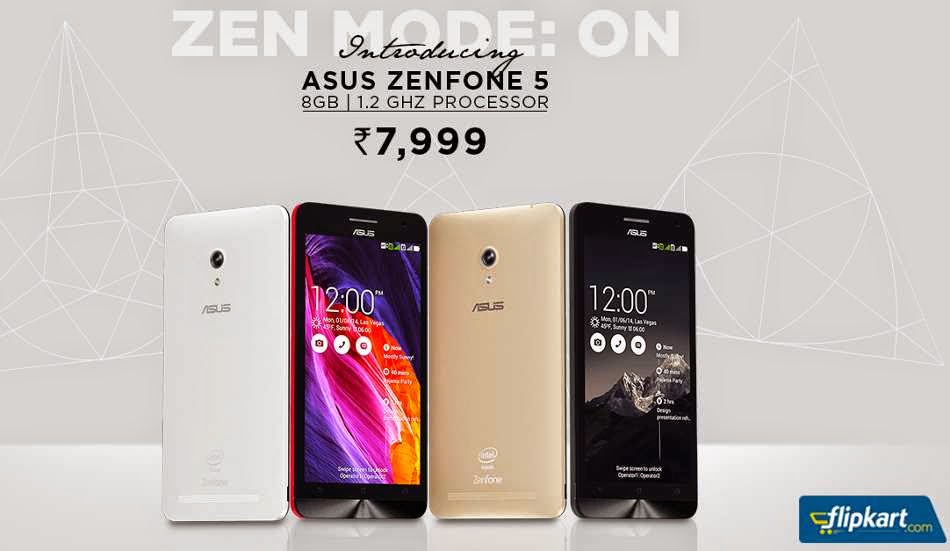
New Asus Zenfone 5 1.2GHz Z2520 processor launched at Rs. 7,999
Asus has launched new Zenfone 5 (A501CG) priced at Rs. 7,999. Earlier this month there was a price cut for Asus ZenFone 4 and ZenFone 5. The new Asus ZenFone 5 is available in Flipkart from today.
Asus ZenFone 5 (A501CG) features a 5-inch (1280 x 720 pixels) capacitive multi touch display with Corning gorilla glass 3 powered by 1.2 GHz dual-core Intel Atom Z2520 processor and 2GB RAM. It has an internal storage of 8GB and can be expanded via microSD up to 64GB. It sports a 8MP rear camera with LED flash and a 2MP front facing camera. It runs on Android 4.3 Jelly Bean with Zen UI on top and it is upgradable to Android 4.4 KitKat and has 2110 mAh battery.
Key Features :
Asus ZenFone 5 (A501CG) features a 5-inch (1280 x 720 pixels) capacitive multi touch display with Corning gorilla glass 3 powered by 1.2 GHz dual-core Intel Atom Z2520 processor and 2GB RAM. It has an internal storage of 8GB and can be expanded via microSD up to 64GB. It sports a 8MP rear camera with LED flash and a 2MP front facing camera. It runs on Android 4.3 Jelly Bean with Zen UI on top and it is upgradable to Android 4.4 KitKat and has 2110 mAh battery.
![]() |
| Asus Zenfone 5 |
- 5-inch (1280 x 720 pixels) capacitive multi touch display with Corning gorilla glass 3
- 1.2 GHz dual-core Intel Atom Z2520 processor
- 2GB RAM
- 8GB internal storage, Expandable via microSD up to 64GB
- 8MP rear camera with LED flash
- 2MP front facing camera
- Android 4.3 Jelly Bean with Zen UI on top, Upgradable to Android 4.4 KitKat
- 3G HSPA+, WiFi 802.11 b/g/n, Bluetooth 4.0, GPS
- 2110 mAh battery
Dual Booting Windows 8 and Ubuntu UEFI using Rufus
What is UEFI?
Short for Unified Extensible Firmware Interface, UEFI is a specification that defines a more modernized model for the interface between computer operating systems and platform firmware during the boot, or start-up, process.
The UEFI specification offers advanced features over BIOS such as secure boot, low-level cryptography, network authentication and universal graphics drivers. The Secure Boot functionality in UEFI provides the basis for the Microsoft Secure Boot feature in Windows 8 that enables the OS to detect rootkits and similar malware attacks.
What is Rufus?
Rufus is a utility that helps format and create bootable USB flash drives, such as USB drives, memory sticks etc.
It can be particularly valuable for situations where:
- You have to make USB installations media from bootable ISO’s (Windows, Linux, UEFI, etc.)
- You have to deal with a system that doesn't have an OS installed
- You have to flash a BIOS or other firmware from DOS
- You need to run a low-level utility
Users can download Rufus from here.
Installation steps
Step 1: Select the appropriate device
Step 2: Select the partition scheme
Step 2.1: How to find out the partition scheme in your system
Right click on My Computer → Manage → Disk Management
Right click on Disk0 → Properties → Volumes
Step 3: Select the ISO image
Step 5: Press start to make your selected device bootable
Step 6: Restart your computer and select the boot-option for your computer
Step 7: Select the USB storage from your boot menu
Step 8: Ubuntu screen will pop up. Select your language and press continue
Step 9: Where do you want to install Ubuntu. Select something else and continue
Step 10: Select the free space that you have created for installing Ubuntu
Step 11: After selecting the free space, click the plus (+) button and select the mount point as / and type of partition as primary from the popped up dialogue box and press ok
Step 12: The free space is now allocated as /dev/sda6, type is ext4 and the mount point is /
Step 13: Now press install now and your installation will begin
Step 14: Provide your username and password and press continue
Step 15: Once your installation is over it will ask you to restart your computer
Step 16: Now Ubuntu is installed in your machine. Congratulation fell free to use it
Warnings
Please be careful in step 2. Check whether your disk is GPT or MBR and make your device bootable accordingly
Please be careful in step 10. Make sure you select the drive carefully else your windows drive might get overlapped with Linux and you will lose your data too.
Tuesday, 20 January 2015
ASUS Fonepad 8 FE380CG with 3G and Voice Calling Launched in India at Rs. 13,999
ASUS launched ASUS Fonepad 8 (FE380CG) with dual SIM support, 3G and voice calling. ASUS Fonepad 8 FE380CG comes in Black and Gold colors and is priced at Rs. 13,999.
ASUS Fonepad 8 FE380CG features a 8-inch (1280 x 800) HD IPS display with 10 finger multi-touch and Anti-fingerprint coating powered by 1.33 GHz quad-core Intel Atom Z3560 processor with PowerVR G6430 GPU and 2GB RAM. It has an internal storage of 16GB and can be expanded via microSD up to 64GB. It sports a 5MP rear camera and a 2MP front facing camera. It runs on Android 4.4 Kitkat with Zen UI on top and has 4000 mAh battery.
Key Features :
ASUS Fonepad 8 FE380CG features a 8-inch (1280 x 800) HD IPS display with 10 finger multi-touch and Anti-fingerprint coating powered by 1.33 GHz quad-core Intel Atom Z3560 processor with PowerVR G6430 GPU and 2GB RAM. It has an internal storage of 16GB and can be expanded via microSD up to 64GB. It sports a 5MP rear camera and a 2MP front facing camera. It runs on Android 4.4 Kitkat with Zen UI on top and has 4000 mAh battery.
![]() |
| ASUS Fonepad 8 FE380CG |
- 8-inch (1280 x 800) HD IPS display with 10 finger multi-touch and Anti-fingerprint coating
- 1.33 GHz quad-core Intel Atom Z3560 processor with PowerVR G6430 GPU
- 2GB RAM
- 16GB internal storage, Expandable via microSD up to 64GB
- 5MP rear camera
- 2MP front facing camera
- Android 4.4 Kitkat with Zen UI on top
- 3G HSPA+(voice calling), WiFi 802.11 b/g/n, Bluetooth 4.0, GPS
- 4000 mAh battery
Commenting on the announcement, Peter Chang, Regional Head, South Asia & Country Manager, System Business Group, ASUS India, said,"Redefining the user experience of calling tablets category, we are elated to bring our 8 inch Fonepad 8 to the country. The device features next generation interface ‘ASUS ZenUI’ improves on your smart device experience, giving you a brand new user interface that features over 1000 upgrades and enhancements over the standard Android operating system. Our Fonepad series have constantly introduced widely accepted innovation and all the necessary functionality; which has been loved by all our users. This encourages us to go beyond the regular and deliver incredible".
Monday, 19 January 2015
Swipe Ultimate Tab 3G with 10.1-inch Display Built-in 3G launched for Rs. 19,999
Swipe Technologies launched the Swipe Ultimate Tab 3G. It supports inbuilt 3G SIM and has USB 3.0. It is available in Black color and will be available from 1st January on Swipe website and leading e-commerce portals.
Swipe Ultimate Tab 3G features a 10.1-inch (800 x 1280 pixels) multi-touch IPS display with Zero Air Gap touch powered by 1.33GHz quad-core Intel Atom Z3735F processor and 2GB RAM. It has an internal storage of 32GB. It sports a 5MP auto focus rear camera and a 2MP front facing camera. It runs on Windows 8.1 OS and has 7000 mAh battery.
Key Features :
Swipe Ultimate Tab 3G features a 10.1-inch (800 x 1280 pixels) multi-touch IPS display with Zero Air Gap touch powered by 1.33GHz quad-core Intel Atom Z3735F processor and 2GB RAM. It has an internal storage of 32GB. It sports a 5MP auto focus rear camera and a 2MP front facing camera. It runs on Windows 8.1 OS and has 7000 mAh battery.
![]() |
| Swipe Ultimate Tab 3G |
- 10.1-inch (800 x 1280 pixels) multi-touch IPS display with Zero Air Gap touch
- 1.33GHz quad-core Intel Atom Z3735F processor
- 2GB RAM
- 32GB internal storage
- 5MP auto focus rear camera
- 2MP front facing camera
- Windows 8.1 OS
- Magnetic Case with Built-in Keyboard
- 3G (SIM slot), WiFi 802.11b/g/n, Bluetooth 4.0, mini HDMI, USB OTG, USB 3.0
- 7000 mAh battery
Commenting on the new launch, Shripal Gandhi, Founder & CEO, Swipe, said,"Personal computing is a dynamic area where consumer preferences are changing at extreme pace. Staying ahead of the curve is essential to survive in this space. We take extraordinary efforts to anticipate the changing preferences of consumers and develop products that will satiate demanding consumers of today. We have made our latest offering more powerful with a more powerful Intel processor and inbuilt 3G SIM support along with direct USB 3.0 slot to ensure that our customers get the best experience as a laptop. Thanks to our efficient production process, we are able to deliver all of this at an attractive price point".
Subscribe to:
Posts (Atom)