
WhatsApp recently introduced a new feature to let users know that their messages have been read. The app showed a single grey tick and a double grey ticks previously, after the update the double grey ticks turned blue when the user read the message. Now the mobile messaging service is letting users of its Android app disable the feature with the rollout of WhatsApp version 2.11.444. This feature is once more, accessible for Android users. The new 2.11.444 WhatsApp version is available for download on their official website.

Steps to download the latest APK file from WhatsApp
- The smartphone should be running on Android 2.1 or a newer version.
- Go to Settings > Security > Check Unknown sources
- Go to the WhatsApp website and download the APK.
- After downloading, install the app to your phone.
- Open WhatsApp and go to Whatsapp Settings.
- Go to Account > Privacy
- You have the option, Read Receipts. Uncheck the read receipt option to disable blue ticks in your messages.
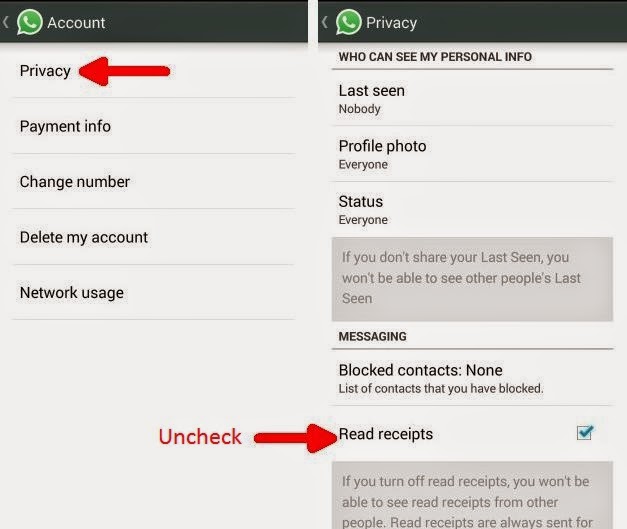 |
| Whatsapp Blue Ticks Disable |
This version is not yet available on play store but you can download it from Whatsapp's official site. Whatsapp has released this feature for Android OS only.
